


Table of Contents
- Why Smart Home Without Subscriptions Matters
- Local Control Smart Home Hubs: The Foundation
- Smart Home Devices With Local Storage for Privacy
- Privacy-Focused Home Automation Without Cloud Dependencies
- Hands-Free Lighting and Motion Sensors
- Smart Control Without Monthly Fees: Practical Setup
- Comparison: Subscription vs. Subscription-Free Costs
- Conclusion
- Frequently Asked Questions
Last Updated: September 22, 2026
Why Smart Home Without Subscriptions Matters
The subscription model has become the default in smart home technology. Most systems require monthly fees for cloud storage, video access, or basic automation. But what if you could build a complete smart home setup without ever paying a recurring charge?
A smart home without subscriptions gives you genuine control. You own your data. You decide what stays local and what moves to the cloud. No surprise price increases. No feature lockouts when you stop paying. This approach appeals to homeowners who want privacy, predictability, and independence from vendor lock-in.
Eve's Curious Collection has curated a selection of smart home devices designed to work independently, with local control at their core. The difference between subscription-based and subscription-free systems goes beyond just cost. It's about architecture. It's about who controls your home.
Local Control Smart Home Hubs: The Foundation
Local control smart home hubs process all your automation rules on the device itself, not on distant servers. No internet required for basic functions. Your lights respond instantly because the hub doesn't need to phone home for permission.
The best local control hubs use open protocols and don't lock you into a single ecosystem. They speak multiple languages: Zigbee, Z-Wave, Thread, and Matter. Understanding these protocols helps you avoid compatibility headaches when mixing devices from different manufacturers.
Zigbee operates on the 2.4 GHz frequency and is designed for low-power wireless mesh networks. Devices relay signals through each other, extending range across your home. Zigbee excels with battery-powered sensors because it consumes minimal power. Most motion sensors, door/window contacts, and temperature sensors use Zigbee.
Z-Wave also uses mesh networking but operates on a different frequency band (908.42 MHz in the United States), which can reduce interference from Wi-Fi and Bluetooth. Z-Wave typically has slightly longer range per hop than Zigbee and is common in door locks, smart switches, and thermostats. The trade-off: Z-Wave devices are often more expensive than Zigbee equivalents.
Thread is a newer mesh protocol built on IPv6, designed for faster response times and better reliability. It works alongside Wi-Fi on the 2.4 GHz band and is increasingly supported by Matter-compatible devices. Thread is ideal if you want sub-second automation response, though device availability is still growing.
Matter is not a wireless protocol itself, it's an application layer standard that works over Zigbee, Thread, Wi-Fi, or Bluetooth. Matter's real value is interoperability: a Matter-certified device from one manufacturer can communicate with a Matter hub from another, eliminating the "locked ecosystem" problem. If you're building a new system, prioritizing Matter-compatible devices future-proofs your investment.
Interoperability troubleshooting: When a device won't connect to your hub, the issue is usually protocol mismatch or range. A Zigbee motion sensor cannot connect to a Z-Wave-only hub. If your hub supports both protocols, verify the device is in pairing mode and within 30 feet of the hub (or within range of a mesh repeater). Some devices require a specific hub firmware version; check the manufacturer's compatibility list before purchasing.

Smart Home Devices With Local Storage for Privacy
Local storage changes the privacy equation entirely. Video from your security cameras stays on your device. No cloud upload. No third-party access. No subscription required to view your own footage.
Privacy-Focused Home Automation Without Cloud Dependencies
Privacy-focused automation means your automation rules live on your hub or local device, not on a vendor's servers. When you set a rule like "turn on lights when motion is detected," that logic executes locally. The system doesn't need to upload sensor data to the cloud to make a decision.
Hands-Free Lighting and Motion Sensors
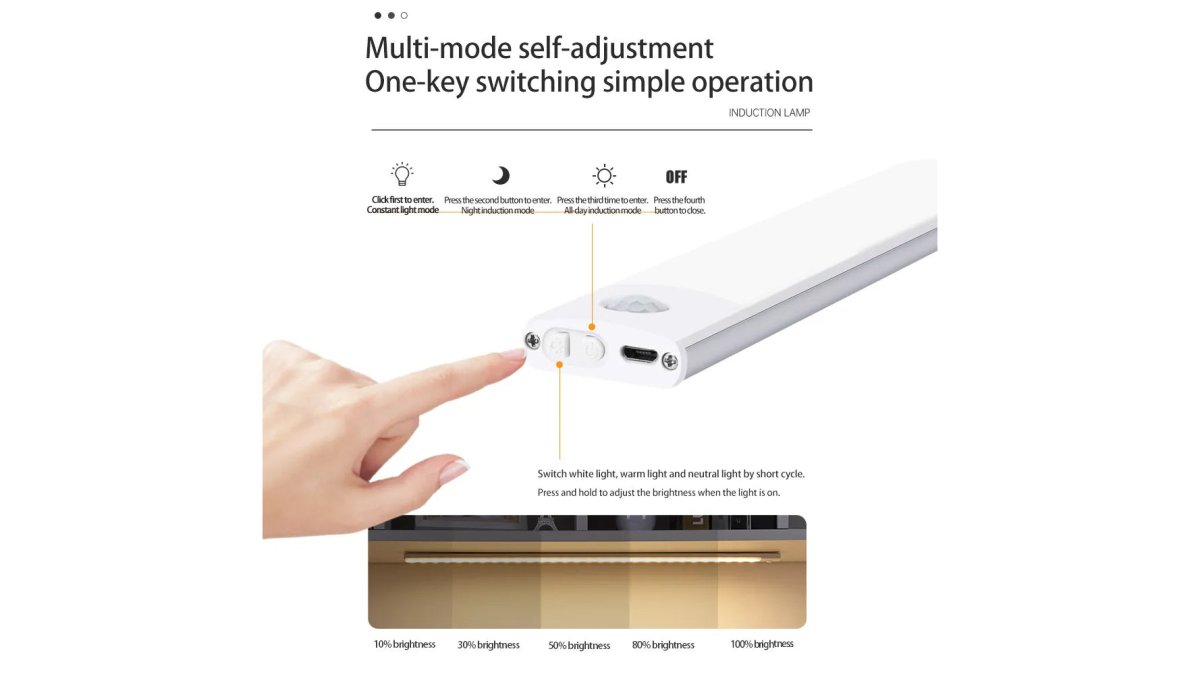
Motion-activated lighting is the simplest smart home automation, and it works perfectly without subscriptions. A wireless motion sensor detects movement and triggers a light. No cloud required. No subscription fee. Pure local automation.
Smart Control Without Monthly Fees: Practical Setup
Building a subscription-free smart home starts with choosing the right hub and understanding the true financial picture over time. For users migrating from cloud-based systems, the transition requires planning to avoid losing automations or device access during the switch.
Step-by-step migration from cloud to local:
-
Purchase and install your local hub in a central location, ideally within 30 feet of most devices and near your router. Power it on and complete the initial setup (usually a mobile app walkthrough). Do not remove your old cloud hub yet.
-
Add devices to the new local hub one room at a time. Start with non-critical devices (lights, motion sensors) rather than security cameras or locks. Verify each device connects and responds locally before moving to the next.
-
Recreate automations on the new hub. Manually rebuild your rules using the new hub's automation interface. This is tedious but necessary, most hubs cannot import automations from competitors' systems. Start with simple rules (motion triggers light) before complex ones (time-based + sensor + conditional logic).
-
Test all automations with the internet disconnected. Unplug your router or disable Wi-Fi on the hub. Trigger motion sensors, change temperatures, and verify lights respond. If automations fail offline, your hub is still relying on cloud processing, contact the manufacturer or check hub settings.
-
Migrate critical devices last. Once you're confident in the new system, move security cameras, door locks, and thermostats. These devices often have the most complex automations and the highest cost of failure.
-
Decommission the old cloud hub only after all devices are migrated and you've confirmed the new system is stable for at least one week. Keep the old hub powered on during this period in case you need to roll back.
Total cost of ownership analysis:
| Cost Factor | Subscription-Based | Subscription-Free |
|---|---|---|
| Hub hardware | $50-150 | $80-200 |
| Monthly hub fee | $5-15 | $0 |
| Per-camera cloud storage | $5-10 each | $0 |
| Local storage hardware (NAS or hub) | $0 | $100-300 (one-time) |
| 5-year total (3 cameras, 1 hub) | $1,350-2,700 | $500-1,000 |
| Data ownership | Vendor | You |
| Internet dependency | Required | Optional |
Verifying local processing is actually working:
- Disconnect the hub from the internet (unplug the Ethernet cable or disable Wi-Fi). Trigger a motion sensor or change a temperature setting. If automations respond, local processing is active.
- Check hub logs for cloud API calls. Most hub interfaces show a connection status or activity log. If you see constant cloud requests during local automation, the hub is not processing locally despite claims.
- Test latency with a stopwatch. Local automations typically respond in under 500 milliseconds. Cloud-based automations take 1-3 seconds. If your motion sensor takes several seconds to trigger a light, suspect cloud processing.
- Review hub documentation for which features require internet. Most hubs process basic automations locally but require internet for remote access, firmware updates, or advanced features like AI-powered routines.
Comparison: Subscription vs. Subscription-Free Costs
The financial case for subscription-free systems becomes clear over time. Upfront hardware costs are higher, but you eliminate recurring fees entirely.
| Cost Factor | Subscription-Based | Subscription-Free |
|---|---|---|
| Hub hardware | $50-150 | $80-200 |
| Monthly hub fee | $5-15 | $0 |
| Per-camera storage fee | $5-10 each | $0 |
| 5-year total (3 cameras) | $1,350-2,700 | $400-800 |
| Data ownership | Vendor | You |
| Internet dependency | Required | Optional |
Conclusion
A smart home without subscriptions isn't a compromise, it's a different philosophy. You trade convenience (instant cloud access from anywhere) for control (local processing, data privacy, cost predictability). For most homeowners, that trade makes sense.
Frequently Asked Questions
Can I run a smart home entirely offline without subscriptions?
Yes. Local control smart home hubs process automation rules on the device itself rather than sending data to cloud servers. This means your system works even if internet goes down. Devices like motion sensors and smart lighting communicate directly with the hub using protocols like Zigbee or Z-Wave, eliminating the need for cloud storage or monthly fees. You control everything through a local app on your phone or a physical dashboard.
What are the privacy benefits of smart home devices with local storage?
Local storage keeps your video footage, automation logs, and device data on your own hardware instead of uploading to corporate servers. This gives you data sovereignty, your information never leaves your home. You avoid cloud subscription fees, reduce exposure to data breaches on remote servers, and maintain full control over what happens to your footage. Many people find this trade-off worth the slightly higher upfront hardware cost.
How much can I save by avoiding smart home subscriptions?
Subscription costs vary widely. Many cloud-based security cameras charge $5-$20 per camera monthly for video storage and features. Over five years, one camera costs $300-$1,200 in subscriptions alone. A subscription-free motion sensor light costs around $14 as a one-time purchase. Smart IR remote adapters start at $10.71. While local-control hubs may cost more upfront, you break even within 12-24 months and save thousands over the device's lifetime.
What's the difference between local control and cloud-based smart home systems?
Local control processes automation rules on a hub in your home, faster response times, no latency, works offline. Cloud-based systems send commands to remote servers, which adds delay and requires internet. Local systems give you privacy and lower long-term costs but may have a steeper learning curve for setup. Cloud systems are easier to start but lock you into recurring subscriptions and depend on company servers staying online.
Ready to eliminate smart home subscriptions? Explore Eve's Curious Collection's curated selection of privacy-first smart home devices. Find the exact tools you need to build a subscription-free automation system that works for your home, with fast shipping and hand-picked quality you can trust.


